
Notice: This Wiki is now read only and edits are no longer possible. Please see: https://gitlab.eclipse.org/eclipsefdn/helpdesk/-/wikis/Wiki-shutdown-plan for the plan.
Configuring a Custom Coordinated Cache (ELUG)
Contents
Configurable Options for a Custom Coordinated Cache
| Option to Configure | Workbench |
Java |
|---|---|---|
|
Configuring cache coordination change propagation at the descriptor level |
|
|
|
|
| |
|
|
| |
|
|
|

For more information, see Custom Coordinated Cache.
Configuring Transport Class
To configure a custom coordinated cache, you must specify your custom instance of org.eclipse.persistence.sessions.coordination.TransportManager.
How to Configure Transport Class Using Workbench
To select the transport class for the user defined coordinated cache, use this procedure:
- Select a session or session broker in the Navigator. Its properties appear in the Editor.
- Click the Cache Coordination tab. The Cache Coordination tab appears.
- Ensure the Enable Cache Coordination option is selected and the Type is User Defined (see Cache Coordination).
Cache Coordination, Transport Class Option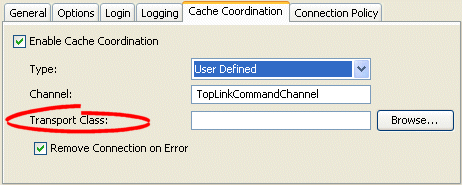
- Click Browse and select the transport class for the user-defined coordinated cache.

How to Configure Transport Class Using Java
Create a custom instance of the org.eclipse.persistence.sessions.coordination.TransportManager that you use as a transport class for your coordinated cache.
You obtain the TransportManager using the following Session API:
Session.getCommandManager().getTransportManager()